
How it works
How one DNS zone lives on two providers
Five pictures, from how any DNS lookup works to what RedundantDNS does on every change and during an outage.
1. How DNS resolution works
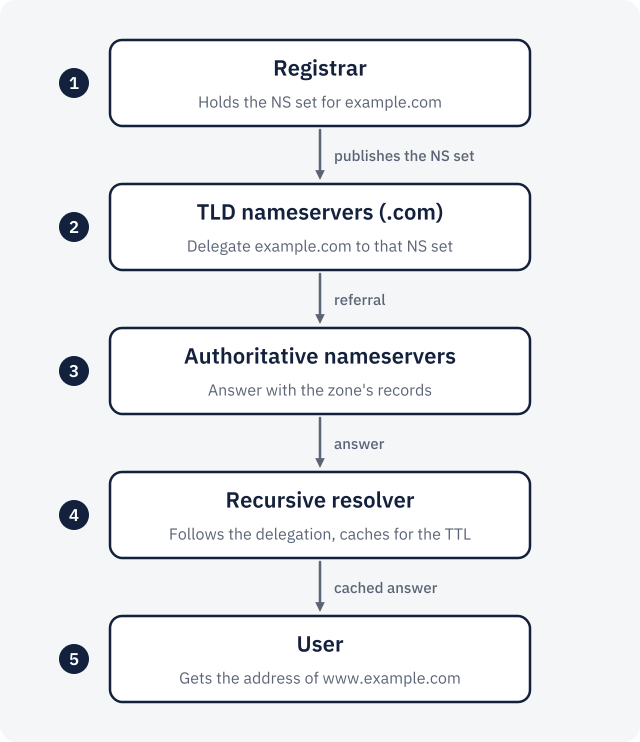
When someone opens www.example.com, their device asks a recursive resolver (their ISP’s, or a public one). On a
cache miss, the resolver walks down a chain of delegations.
Your registrar publishes the domain’s NS set (the list of nameservers that are authoritative for it) at the
TLD nameservers for .com. The TLD nameservers answer the resolver with a referral to that NS set. The resolver then asks one of
the
authoritative nameservers, gets the record, caches it for its TTL and returns it.
Those authoritative nameservers belong to your DNS provider. If the NS set lists only one provider and that provider stops answering, every cache miss for your domain fails.
2. One zone, two providers
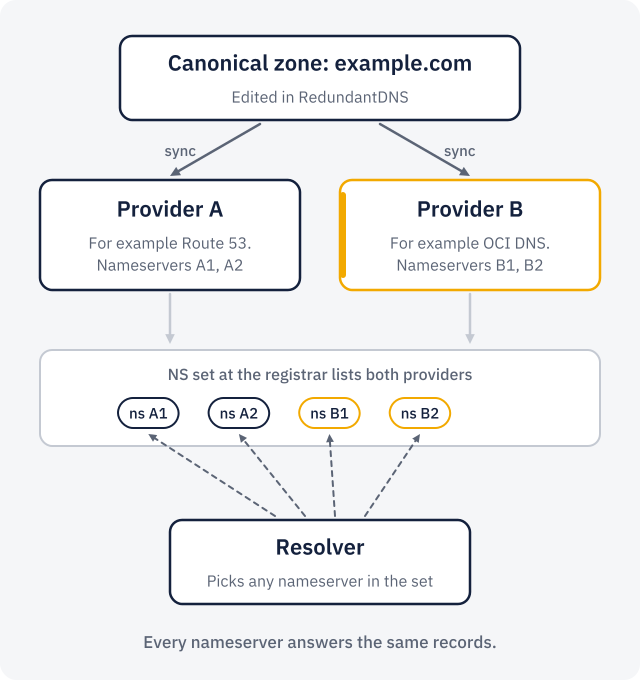
RedundantDNS keeps a canonical zone: the records you want, stored once. It writes that zone to every provider attached to it, for example Route 53 and OCI DNS, as two complete, independent copies.
The NS set at your registrar lists the nameservers of both providers, and the apex NS record inside the zone does too (the platform manages it for you). Resolvers treat all nameservers in the set as equals: they pick one, and if it does not answer, they try another.
Because both copies hold the same records, it does not matter which one answers. Keeping them identical is the hard part, and it is what the next picture is about.
On Cloudflare this uses its Multi-provider DNS setting, which RedundantDNS turns on when it attaches a zone. The registrar has to let you edit the NS set: a domain registered at Cloudflare Registrar can only use Cloudflare’s nameservers. The Cloudflare Registrar guide explains the options, and the Cloudflare permission guide covers the rest.
3. What happens on every change
- Canonical zone. You change a record in the dashboard, the API, Terraform or through MCP. The change is journaled and audited.
- Diff. RedundantDNS lists each provider’s records and compares them with the zone, restricted to what every attached provider supports (the zone’s effective capabilities are their intersection).
- Apply. Each provider receives only the changes it needs, in its own API’s terms. Applying is idempotent: running it twice changes nothing.
- Verify. Every provider is read back and compared with the zone. A mismatch is drift.
- Probes. Between changes, probes query every nameserver directly from each probe region (UDP with TCP fallback) and compare the answers and serials with the zone.
When a provider drifts, for example because someone edited a record in its console, you get an alert. You can reconcile (push the zone again) or adopt the provider’s change into the zone.
4. When a provider goes down
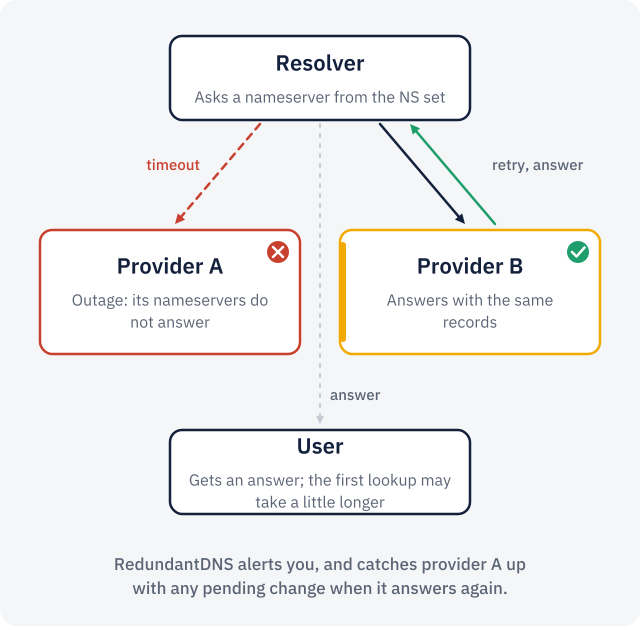
Say provider A has an outage and its nameservers stop answering. A resolver that picks one of them times out and retries another nameserver from the NS set. Provider B answers with the same records, so the user gets an answer. The first lookup can take a little longer because of the timeout; after that the answer is cached for its TTL.
Meanwhile the probes see provider A down. After the number of failed probes you set (two by default), and from as many probe regions as you
require, RedundantDNS fires a provider_down alert by email, signed webhook or Slack. Changes you make during the outage apply to
provider B at once; provider A shows a sync error and is caught up when its API answers again.
A second provider protects you from a provider failing. It does not protect you from a wrong record: that one is copied to both. Our write-up of the October 2025 AWS outage goes into that difference.
5. Access levels and where credentials live
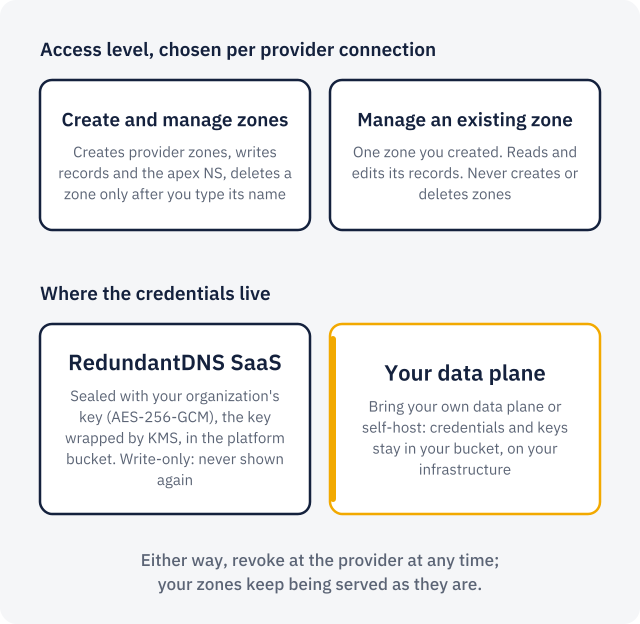
Each provider connection uses one of two access levels, and each provider’s guide has the exact policy or role to copy:
- Create and manage zones: RedundantDNS creates the provider zone, writes records and the apex NS, and deletes the zone only when you detach it and type the zone name.
- Manage an existing zone: you create the zone; RedundantDNS reads and edits its records and never creates or deletes zones.
In the SaaS, credentials are encrypted as soon as they arrive, sealed with your organization’s own key (AES-256-GCM), and that key is wrapped by a KMS. They are write-only: nobody, including you, can read them back. With your own data plane or a self-hosted install, credentials and keys stay in your bucket on your infrastructure.
Revoke a credential at the provider whenever you like. Your zones keep being served exactly as they are. Security details.
Put your zone on two providers
Start with one zone and two providers you already have. Free, no card.